
 What is it?
AppMgr helps you to move apps to either external or internal storage thru' the system Settings.
Features
- list movable apps
- move one or all apps to SD card
- clear app cached files with 1 tap
- export the app list to SD card
- install apps from the exported app list
- add movable apps to the ignore list
- show app cache/data/code/total size
- show storage total/available size
- list non-movable apps
- move app back to the internal storage
- view app on Market
- uninstall app
- open app
- show app details page
- support "Move2SD Enabler"
- notify if movable app installed
|
|
Supported OSs- Android compatible device.
- 2.2 (Froyo) or above
|
|
User's ManualThe main window contains three pages, MOVABLE, On SD card and Phone Only..
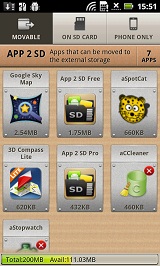
MOVABLE Page
This window lists movable applications that are installed on
the internal device storage. You can move an application to SD card by
tapping the application icon. Long-press the application icon will show
you more options.
You can add a movable app to the ignore list by long-pressing the application icon. No movable app installed notification will be given for the ignored apps.
Please note that only movable applications will be listed on this window.
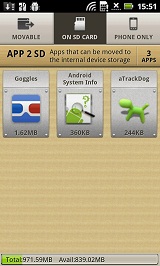
On SD card Page
This window lists movable applications that are installed on the external
storage (SD card). You can move an application to the internal storage
by tapping the application icon. Long-press the application icon will
show you more options.
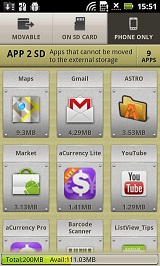
Phone Only Page
This window lists applications that are installed on the internal device
storage and they do not allow you to move them to the external storage.
Tapping the application icon will bring you to the Android Market. Long-press
the application icon will show you more options.
|
|
FAQ - Why not all apps can be moved to the external storage?
Beginning with Android 2.2(froyo), developers can allow their applications to be installed on the external storage (for example, the device's SD card). This is an optional feature developers can declare for their applications. If developers do not declare it, their applications will be installed on the internal storage only and it cannot be moved to the external storage. If you find any non-movable apps, please kindly email developers(not us) for details.
- What is the app cache? Is it safe to clear them?
The app cache storage is used for applications to cache some data. When the device is low on internal storage space, Android may delete these cache files to recover space; hence it is safe for you to clear the cached files manually.
- Can all apps be installed on the external storage?
If app uses any of the following features, it cannot be installed on the external storage. It's required by Android system.App Widgets, Services, Input Method Engines, Live Wallpapers, Live Folders, Alarm Services, Account Managers, Sync Adapters, Device Administrators
- Will it auto install my apps after switching to a new phone?
This app is not used to backup apps to SD card. It only helps you to move a portion of apps used space to SD card. You have to manually install the apps after switching to a new phone or perform a hard reset.
- I have problem to download or install your app from Android
Market
This is the problem of Android Market. Please read Android Market Troubleshooting Download Issues for how to solve this issue.
- Failed to upgrade apps that installed on the SD card, or move
apps to SD card, or I got an error -18
Please first make sure that you are not connecting your phone with PC as an USB disk, then try to upgrade or move the app again. If you still get the problem, it should be caused by the bug of Android system. Please follow the instructions below to fix it (WARNING: These instructions are for advanced, technical users only, use at your own risk): - Mount the device's SD card on your computer via USB
- Open the drive for the SD card in Windows Explorer
- You should see a ".android_secure" directory, open it. If you don't see this directory, right-click in the Window and choose "show hidden files" (or something like that)
- Delete the smdl2tmp1.asec file in the directory. DO NOT delete any other files you see in the .android_secure directory, you may end up deleting your applications and other associated data
- Mount the device's SD card on your computer via USB
- Look in Finder to see what the SD card is called, often it is called "NO NAME", for our purposes we'll call it $NAME
- Open a Terminal (Applications > Utilities > Terminal) window
- Type "rm /Volumes/$NAME/.android_secure/smdl2tmp1.asec" REMEMBER: Replace $NAME with the name of your SD card from step 2. If $NAME has spaces or any character that is not a number or letter, it should be replaced with that BACKSLASH and a space, eg. "/Volumes/NO\ NAME/.android_secure/smdl2tmp1.asec" or "/Volumes/I\ said\ \"OH\ HAI\"/.android_secure/smdl2tmp1.asec"
- App icons disappearing from home screen after device rebooted
It's the bug of Android or native Launcher app. You can fix the Android bug by re-mounting the SD card. - Launcher > MENU > Settings > SD card & phone storage > Unmount SD card
- Launcher > MENU > Settings > SD card & phone storage > Mount SD card
- I have two external storages, App 2 SD only moves apps to
the internal USB storage.
Moving app to SD is handled by Android. App 2 SD app only provides an UI for you to manage it. Currently, Android only supports the primary external storage (i.e. internal USB storage) for App 2 SD. If you have two external storages, the external SD card usually is the secondary external storage. Android only moves apps to the primary external storage.
- I cannot find the "Move to xxx" button from application detailed
information window.
Moving app to SD is handled by Android. App 2 SD app only provides an UI for you to manage it. Currently, Android only supports the primary external storage for App 2 SD. If the device does not have a real primary external storage or the primary external storage is emulated from the internal phone storage. Moving app to SD function will not be supported by Android system. It's the limitation of hardware. Please get more information from device manufacture.
- What is the small grey SD card with an 'x' on it?
Some of movable apps will show a small grey SD card with an 'x'. Please long press the app icon and then tap the "Lower-right icon?" menu item from the pop-up menu. It will explain the details.
- Why does App 2 SD request the superuser permission?
App 2 SD only requests the superuser permission on rooted devices. If you grant the superuser permission to App 2 SD, the uninstall confirmation is not required when you uninstall an app.
For Windows users
For Mac users
Please read unable to remove app and cannot install apps on sd card and installing app unsuccessful - unknown error -18 for more details.
If remounting the SD card cannot fix the problem, it should be the bug of native Launcher app. Please report this issue to phone manufacture or use 3rd app manager, e.g. App Organizer to manage the installed apps. For more details, please refer to Workaround for missing or disappearing App icons and Apps moved to SD
|
|
AppendixTo get the latest version, please visit http://android.a0soft.com. If you find any incorrect information, please also e-mail your problems to a0soft@gmail.com.
|